The anti-detect browser that runs the whole account.
Profiles, proxies, codes, cards, tasks. One app.

Every profile is its own device.
Exora BrowserProfile status here: created
Profiles launch in Exora, the Chromium-based browser we build for running many identities at once. To the sites you visit, each profile looks like an ordinary, up-to-date Chrome on its own machine. Inside, nothing crosses between them.
- Fingerprint
- Canvas, WebGL, GPU, audio, fonts, screen, time zone, media devices and WebRTC, consistent for the life of the profile.
- Isolation
- Cookies, cache, storage and sessions are kept separate for every profile.
- Sync
- A profile picks up where it left off, on your machine or a teammate's.
- Templates
- New profiles start from your org's templates, already set up the way you work.
Vet every exit before a profile uses it.
ProxiesProfile status here: vetted
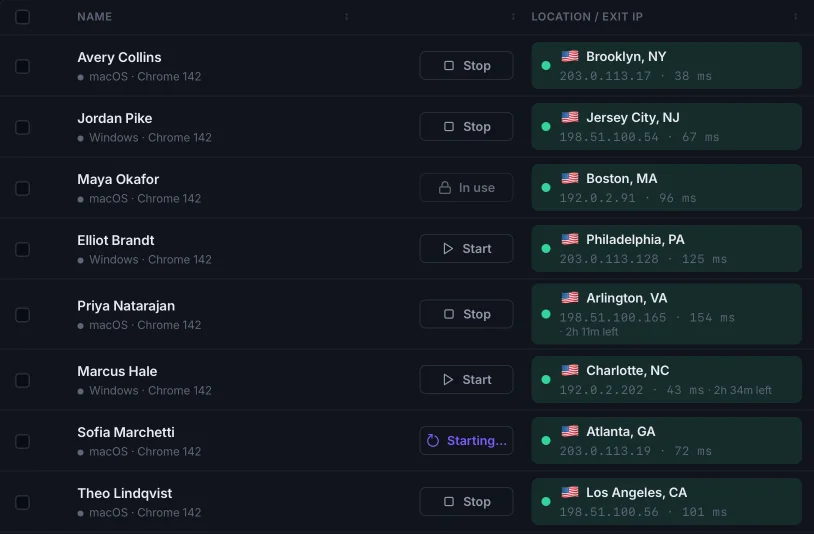
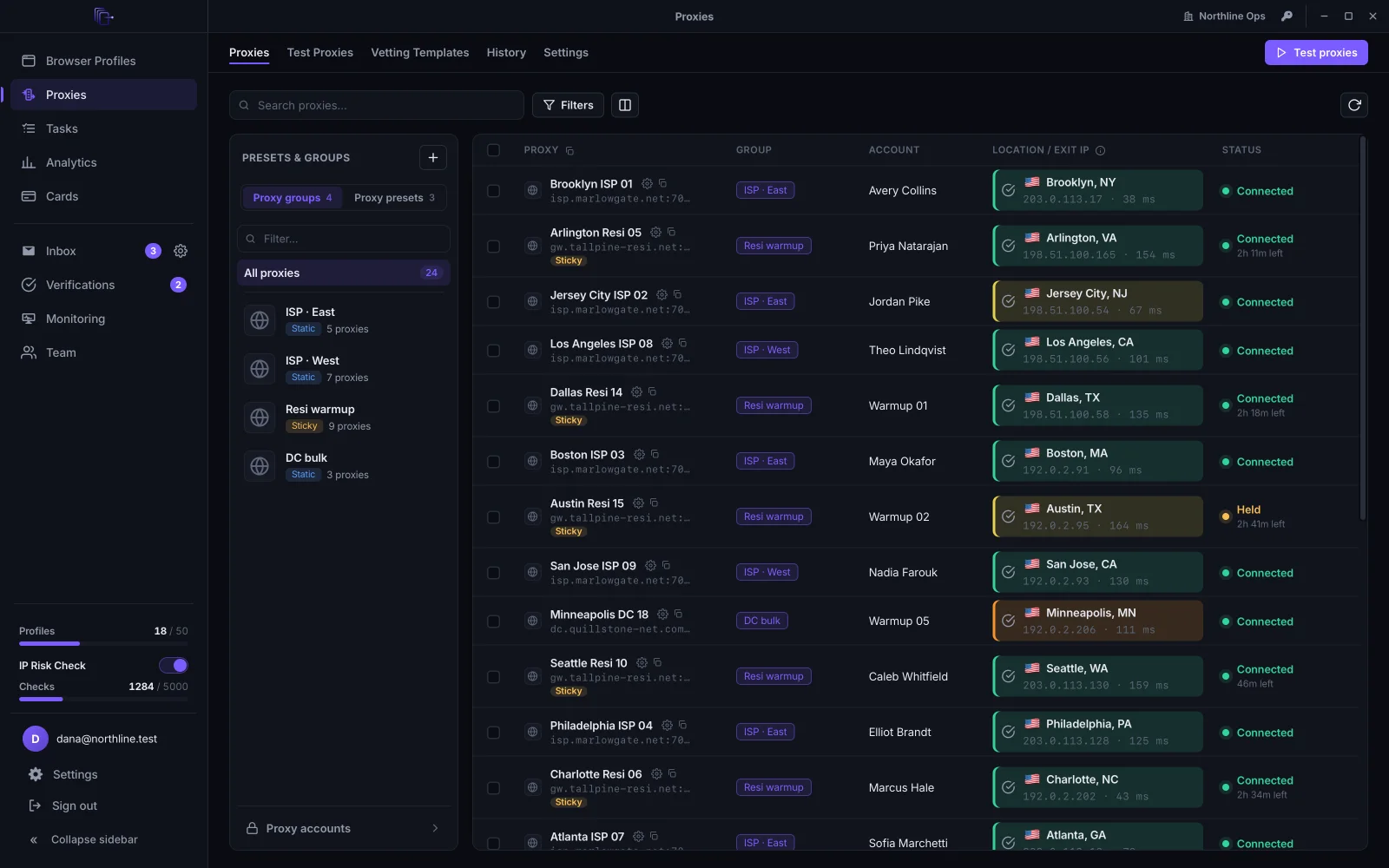
Bring proxies from any provider. ExitNode tests each one against the sites you actually work, gives it an IP risk score, and keeps sticky sessions on the same exit. Exits in use keep getting checked: when an IP changes, goes dead or turns risky, it is held or retired before a profile runs on it.
- IP risk score
- Every exit is scored before you assign it, and rescored while it is in use.
- Your own targets
- Test against the sites you work, not a generic speed check.
- Sticky sessions
- Keep a profile on the same exit for as long as the session lasts.
- Geo
- Point a group at a new country, state or city in one change.
Codes land where the profile is.
Inbox and codesProfile status here: verified
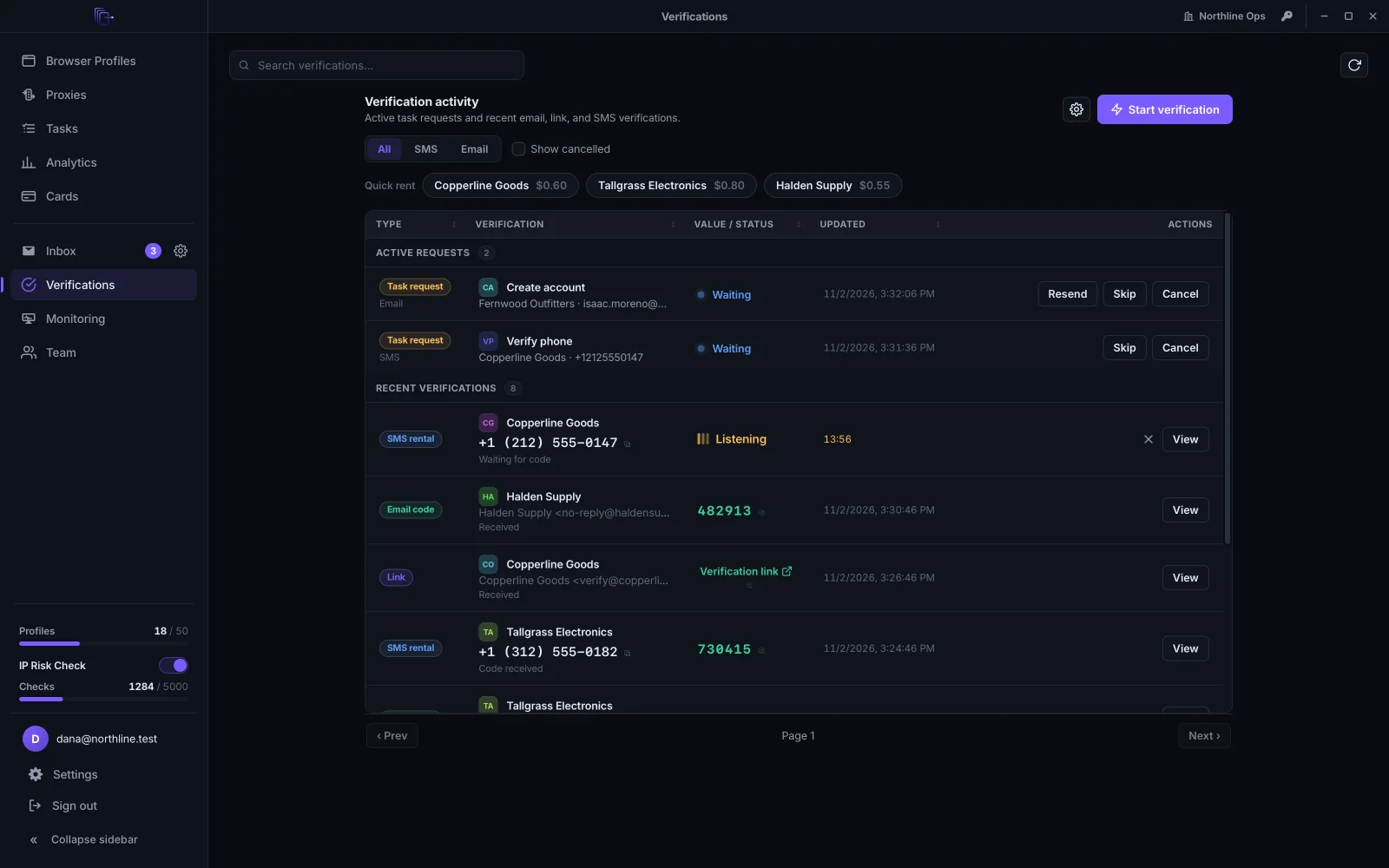
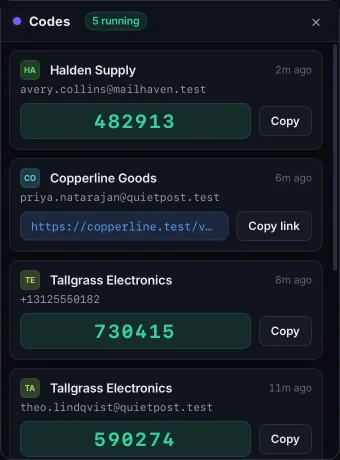
Point a catch-all domain at ExitNode or connect a mailbox, and every address becomes a live inbox. Email codes and magic links are picked out as they arrive and shown in a realtime feed, plus a floating HUD that stays on top while you work. Need a phone number? Rent one for an SMS code, refunded if none arrives.
- Catch-all domains
- Every address on your domain is an inbox, with nothing to set up per address.
- Mailboxes
- Forward from Gmail, connect IMAP, or keep mail on this device only.
- SMS
- Temporary numbers for phone verification, refunded when no code comes.
- Codes HUD
- New codes float above whatever you are doing.
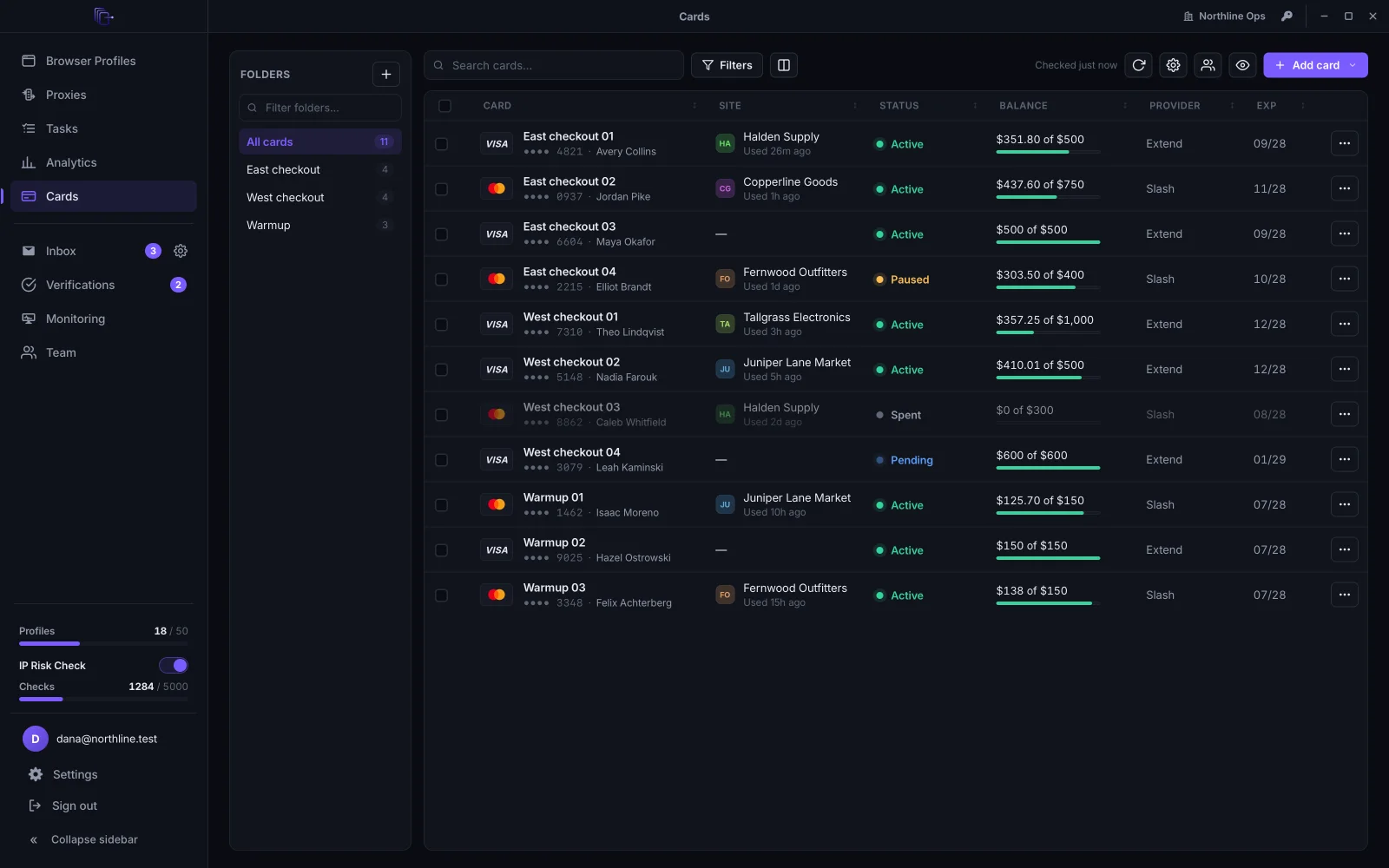
A card for every profile, kept on your device.
CardsProfile status here: funded
Connect the card issuers you already use, like Extend and Slash, and issue a virtual card for each profile without leaving ExitNode. Card numbers are encrypted on your device before they sync, so we can never read them, and each card shows its live state at the issuer.
- Issuers
- Extend and Slash, connected with your own accounts.
- Encrypted on your device
- Card numbers are encrypted before they leave your device. We can't read them.
- Live state
- See whether a card is active, locked or closed at the issuer.
- Autofill
- Fill card details into the profile's checkout from an in-page menu.
Tasks that sign in and check out for you.
TasksProfile status here: working
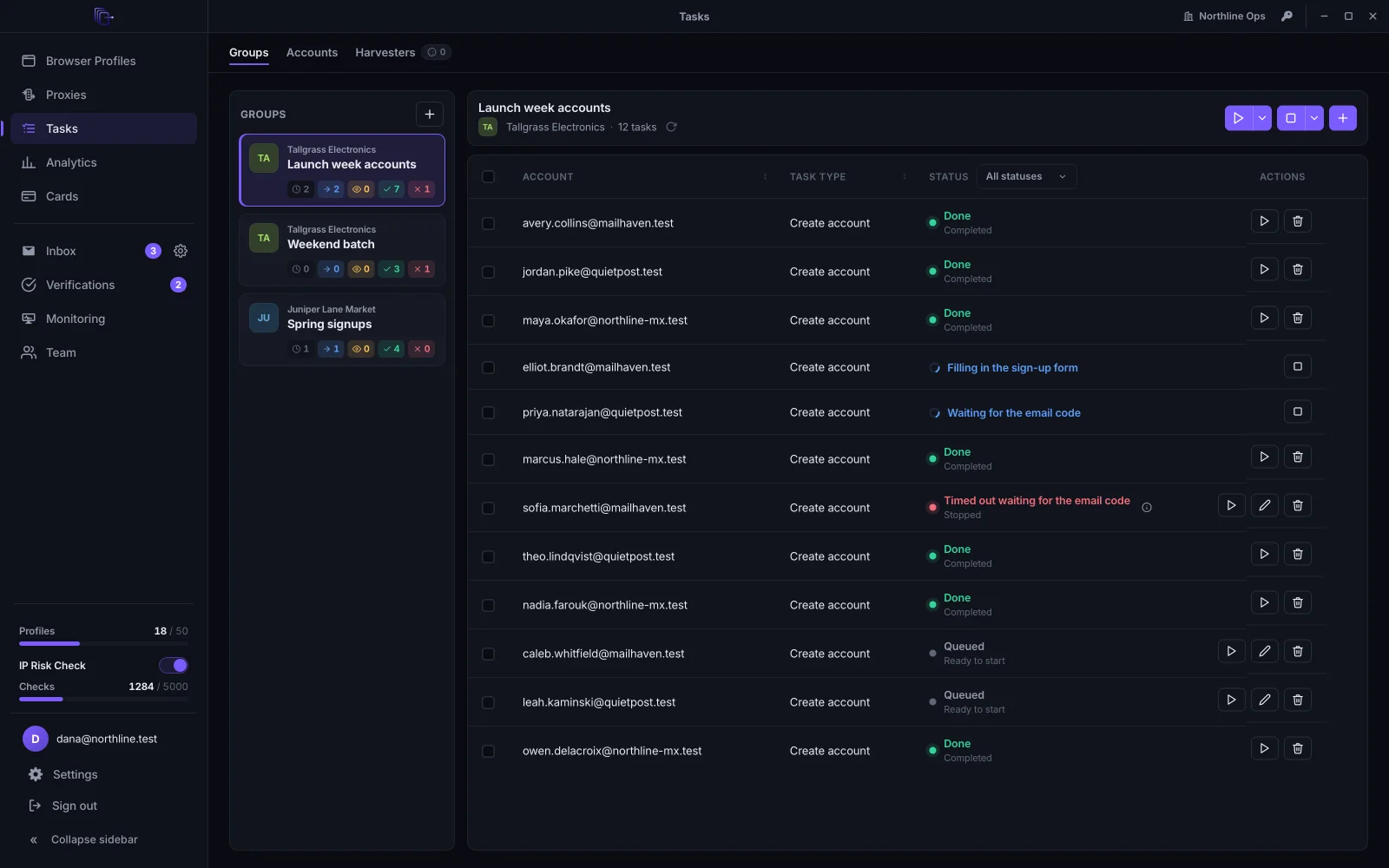
Queue account creation, sign-in, cookie warming, add-to-cart and checkout across your profiles, on the sites you work. Recipes are kept up to date on our side, so new sites and fixes arrive without an app update. Analytics shows what checked out and what didn't.
- Account creation
- Set up new accounts on the sites you work, each on its own profile, exit and inbox.
- Sign-in and warming
- Keep accounts signed in and their cookies warm.
- Cart and checkout
- Add to cart and check out with the profile's own card.
- Analytics
- Checkout and account-creation results, checked against the order emails that follow.
Run a team without passing passwords around.
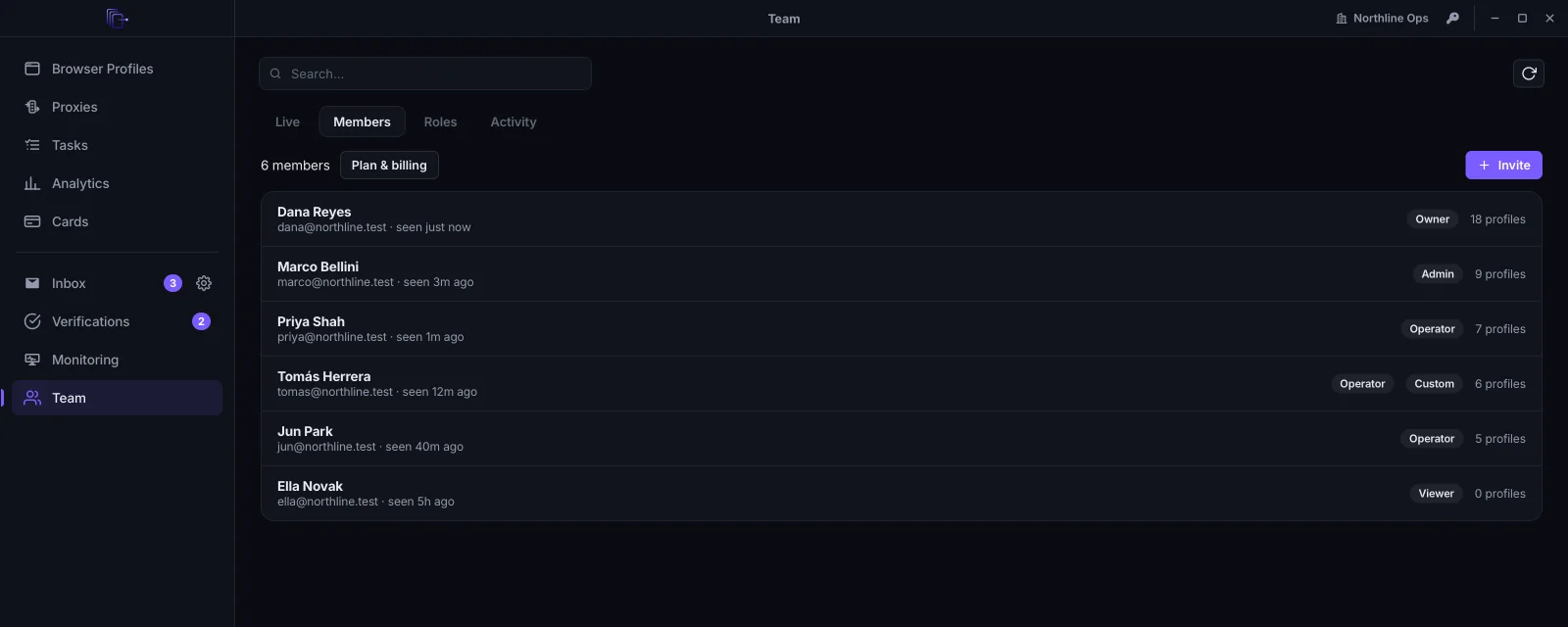
Invite teammates into your org, give each a role and folder access, and share one credit balance with a spend limit per member. Members see only what their role allows, and owners can watch a running profile live when monitoring is on.
- Roles and folders
- Decide who can see, launch or edit each folder of profiles.
- Shared credits
- One balance, with a spend limit for each member.
- Activity log
- Every action by every member, in one place.
- Live monitoring
- Watch running profiles from your desk, switched on per profile.
Built for operators who automate.
The rest of the toolkit, for when you script, scale up or hand work to someone else.
Profile Synchronizer
Drive one profile and the same clicks, typing and tabs repeat across the others.
Desktop app
Local automation API
Attach Puppeteer, Playwright or Selenium to any running profile from your own scripts.
On your machine
Harvesters
Background browsers that prepare what tasks need ahead of time, so runs don't wait.
Tasks
Extensions
Install browser extensions per profile, or for the whole org at once.
Profiles
Import and export
Move profiles in and out with their cookies, or hand one to a teammate.
Profiles
Most anti-detect browsers stop at two columns.
Profiles and proxies are where they end. Every column after that comes with ExitNode, on every profile.
- FingerprintExitNode: EXORA. Profiles and proxies only: YES.
- ProxyExitNode: VETTED. Profiles and proxies only: YES.
- IP riskExitNode: 04 LOW. Profiles and proxies only: not included.
- CodesExitNode: LIVE. Profiles and proxies only: not included.
- CardExitNode: 4417. Profiles and proxies only: not included.
- TasksExitNode: RUNNING. Profiles and proxies only: not included.
Priced like a profile browser. Built like the whole stack.
Pay for profiles and members, like everywhere else. Proxy vetting, codes, cards and tasks come with every paid plan. Every paid plan starts with a 7-day free trial.
Free
Try ExitNode on a few profiles.
$0forever
Start free- 3 browser profiles
- 1 member
- Proxy vetting not included
Starter
For one operator running the full stack.
$39/ month
billed monthly
Start 7-day trial- 100 browser profiles
- 1 member, then $5 each
- 300 IP risk checks / month
Pro
Most teamsFor small teams that share profiles.
$99/ month
billed monthly
Start 7-day trial- 300 browser profiles
- 3 members, then $5 each
- 1,000 IP risk checks / month
Business
For larger teams at volume.
$199/ month
billed monthly
Start 7-day trial- 1,000 browser profiles
- 10 members, then $5 each
- 3,000 IP risk checks / month
Every paid plan includes
- Exora browser profiles with their own fingerprint, proxy and inbox
- Proxy vetting against your own sites, with IP risk scores
- Email and SMS verification codes, with the floating Codes HUD
- Virtual cards from the issuers you connect
- Tasks: account creation, sign-in, cart and checkout
- Profile Synchronizer and the local automation API
- Roles, folder access and shared credits for your team
Prices in USD, before any applicable tax. Subscriptions renew automatically until you cancel; cancel anytime in Billing and keep access until the end of the period you paid for. See the Terms. Need more than 1,000 profiles? Talk to us.
How we take care of your data
Your profiles, proxies and inboxes are some of the most sensitive things you own. We treat them that way.
- Private to your team
- Only the people you invite can see your profiles, proxies and inboxes — not other customers.
- Encrypted and isolated
- Your profiles and sessions are encrypted at rest and kept completely separate from every other customer.
- You stay in control
- Export your profiles, hand them to a teammate, or delete them for good — it's your data and your call.
- No leakage between accounts
- Isolation is the default: cookies, storage and sessions stay inside the profile they belong to.
Questions, answered.
What is ExitNode?
ExitNode is a desktop app for running many isolated browser profiles. Every profile gets its own device fingerprint, proxy and inbox inside Exora, our own browser, and ExitNode adds the rest of the account around it: proxy vetting with an IP risk score, email and SMS verification codes, virtual cards, automated tasks and team management, all in one workspace.
How is ExitNode different from GoLogin or Multilogin?
Those tools give you browser profiles and proxies. ExitNode does that too, in a browser we build ourselves, then carries on: it vets every proxy against your own sites, catches verification codes from email and SMS, issues a virtual card per profile, and runs tasks like sign-in and checkout. A profile has everything it needs without a second tool.
How is this different from a normal browser?
Each profile is fully separated: its own cookies, storage, sessions and a unique, consistent device fingerprint (canvas, WebGL, fonts, audio, user agent). Sites see distinct, believable devices instead of one machine running many accounts, so profiles never cross-contaminate and each account keeps a consistent device.
Does ExitNode run on Mac and Windows?
Yes. ExitNode is a desktop app for macOS and Windows. Create a free account to get started.
Do you provide proxies?
You bring your own proxies from any provider, and ExitNode tests and scores them for you: exit IP, IP risk score, location and speed, against the sites you actually use. You assign a vetted, low-risk exit to each profile. We don’t route your traffic through a shared pool; each profile uses the proxy you give it.
Can I receive verification codes?
Yes. Connect a catch-all domain or a mailbox and every address becomes a live inbox; email codes and magic links are picked out and shown in a realtime feed and a floating HUD. Phone verification is available too: receive an SMS code on a temporary number, refunded automatically if none arrives.
Does it work for teams?
Yes. Create an organization, invite teammates and give each a role and folder access. Profiles stay in sync, so anyone with access picks up where the last person left off, and you share one credit balance with per-member spend limits and a full activity log.
How is my data handled?
Your data is scoped to your organization and never shared with other customers, and we never sell it. Browser profile state is encrypted before it is stored, card numbers are encrypted on your device so we cannot read them, and passwords you save for websites never leave your device. You can delete most data yourself, or ask us to delete your account. Our Privacy Policy has the details.
Put your next profile on the board.
Create a free account, then download ExitNode for Mac or Windows. Bring your proxies and we will vet them on the way in.